3D Geometric Objects for Modern Design Projects
3D geometric objects are a powerful tool in the world of design, offering structure, clarity, and visual intrigue. These elements—like cubes, spheres, pyramids, and more complex shapes—are not just mathematical constructs; they're versatile assets that can elevate your creative work across multiple platforms and industries. Whether you're crafting digital illustrations, website graphics, or print materials, incorporating 3D geometric objects can add depth, dimension, and a modern aesthetic to your projects.
The Purpose and Appeal of 3D Geometric Shapes
At their core, 3D geometric objects provide a sense of order and balance. They help designers communicate ideas clearly through form and function. Because these shapes are mathematically defined, they offer precision and consistency, which is especially important in technical and commercial design fields. Their appeal lies in their ability to be manipulated, stylized, and combined with other design elements to create visually striking compositions.
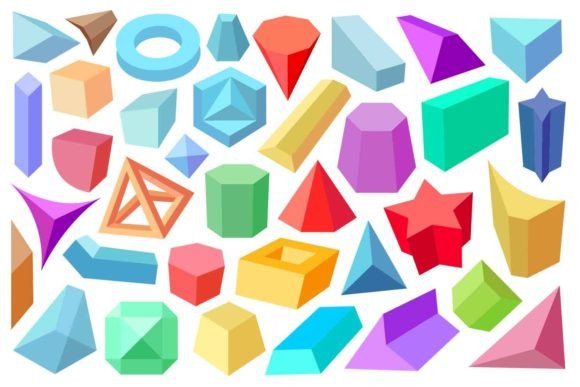
Colorful 3D geometric designs bring an extra layer of vibrancy and energy. By applying gradients, textures, and bold hues to abstract modern shapes, you can transform simple forms into dynamic visuals that catch attention and convey mood or message effectively.
Characteristics That Make 3D Geometry Unique
- Depth and Dimension: Unlike flat 2D shapes, 3D geometries have length, width, and height, making them ideal for creating realistic or stylized spatial effects.
- Scalability: Formats like SVG and EPS allow these shapes to scale without losing quality, perfect for both web and print use.
- Flexibility: You can rotate, extrude, and morph 3D geometric objects to suit various design needs, from minimalistic layouts to complex infographics.
- Compatibility: Available in JPG, SVG, AI, and EPS formats, they work seamlessly across design software such as Adobe Illustrator, Photoshop, and Inkscape.
Why Use 3D Geometric Elements in Your Work?
If you're involved in graphic design, branding, marketing, or even educational content creation, 3D geometric elements can serve many purposes. For instance, they can simplify complex data by organizing it into digestible visual chunks. Or they can act as background patterns to enhance the look of a presentation or blog post. Abstract modern shapes are also popular in UI/UX design, helping to guide user interaction through intuitive visual cues.
Consider how a colorful sphere might represent growth in a business infographic, or how layered pyramids could symbolize a hierarchy in a company structure diagram. The right shape can make all the difference in how your audience interprets your message.
Real-World Uses for 3D Colorful Geometric Designs
- Website Headers and Banners: Add dimension to your site’s layout using 3D geometric overlays. A vibrant triangle or cube can draw the eye and complement your brand colors.
- Product Packaging: Use abstract 3D shapes as part of your packaging design to stand out on store shelves. Their clean lines and vivid colors can evoke innovation and modernity.
- Social Media Graphics: Create engaging posts by integrating 3D geometric elements behind text or icons. These can help break up clutter and add a contemporary flair.
- Infographics and Data Visualization: Transform dry statistics into lively visuals by embedding 3D shapes as charts or decorative accents.
- Interior Design and Architecture: From mood boards to actual blueprints, 3D geometric objects help visualize space, lighting, and furniture arrangements.
Getting Started with 3D Geometric Objects
For beginners, diving into 3D geometry doesn’t have to be intimidating. Many free and paid resources offer ready-made 3D geometric elements in common design formats. Start by selecting a few basic shapes like cones, cylinders, and cubes. Experiment with color combinations and layering techniques to see how they interact with your existing design style.
Design tools like Canva, Figma, and Adobe Illustrator often include libraries of 3D geometric objects. These are usually drag-and-drop friendly, allowing you to focus more on creativity and less on technical complexity. If you're working digitally, SVG and EPS files are especially useful because they maintain crisp edges at any size.
Use Cases for Different Formats
- JPG: Great for quick sharing and online use where transparency isn't required. Ideal for social media posts, website banners, and email headers.
- SVG: Perfect for responsive web design due to its vector-based nature. Scalable without pixelation, and editable in most design software.
- AI (Adobe Illustrator): Offers full editability of shapes, colors, and layers. Best suited for professional designers who need to tweak every detail before final output.
- EPS: Widely supported for print and high-resolution outputs. Retains quality when scaled up, making it a go-to format for logos and detailed illustrations.
Choosing the Right Tools and Resources
Before choosing 3D geometric objects for your project, consider the intended platform and audience. Will your design be viewed on screens or printed? Do you need interactivity or just static visuals? Answering these questions will help determine the best file format and type of geometric elements to use.
Also, think about the color palette. Since these designs are often vibrant, it's important to ensure they align with your brand identity or the tone of your project. A minimalist logo may benefit from a single-colored pyramid, while a children's app might thrive with playful, multicolored spheres and polygons.
Where to Find 3D Geometric Assets
There are several reputable sources for high-quality 3D geometric design elements. Platforms like Shutterstock, Envato, and Flaticon offer extensive collections in JPG, SVG, AI, and EPS formats. Open-source communities such as GitHub and Creative Commons repositories are also great places to find customizable options.
Practical Tips for Incorporating 3D Geometric Elements
Here are some beginner-friendly tips to help you integrate 3D geometric objects into your design projects:
- Balance Simplicity and Complexity: Don’t overload your design with too many 3D shapes. Use them strategically to highlight key areas or concepts.
- Layer Thoughtfully: Combine 3D objects with transparent backgrounds to build depth without overwhelming the viewer.
- Match Brand Guidelines: Ensure the colors and styles of your 3D elements reflect your brand’s personality and guidelines.
- Test Across Devices: Especially if using SVG or AI files, check how your design looks on different screen sizes and resolutions.
Examples of Effective 3D Geometric Design
Let’s say you’re designing a landing page for a tech startup. Adding a rotating cube in the header section can subtly suggest innovation and forward-thinking. Another example: an educator creating a science lesson plan might use 3D geometric models to explain molecular structures or planetary systems, making learning more interactive and visual.
In lifestyle branding, abstract 3D shapes can be used in product photography to frame items or add artistic context. A blogger might overlay a colorful polygon grid in the background of an article feature image to give it a modern, editorial feel.
Important Considerations Before Using 3D Geometric Elements
While 3D geometric objects are incredibly versatile, there are a few things to keep in mind before adding them to your design:
- Licensing: Always verify that the 3D assets you use are properly licensed for your intended purpose, especially if you're working commercially.
- File Size: High-resolution 3D objects can increase file size. Optimize images for web use when necessary.
- Software Compatibility: Not all design programs support every format equally. Know what your team uses before downloading AI or EPS files.
- Aesthetic Fit: Just because a 3D object is available doesn’t mean it should be used. Ensure it enhances—not distracts from—the overall design.
How to Learn More About 3D Geometric Design
If you're interested in mastering the use of 3D geometric elements, start with online tutorials or courses that cover vector design and 3D modeling basics. Websites like Skillshare, Udemy, and YouTube offer step-by-step guides tailored to different skill levels. As you become more comfortable, try creating your own 3D shapes using tools like Blender or Cinema 4D for greater customization.
Conclusion
3D geometric objects and colorful abstract shapes are more than just trendy design elements—they're practical tools that can enhance communication, engagement, and visual storytelling. Whether you're a small business owner looking to revamp your website or a hobbyist experimenting with new styles, understanding how to use these components opens up a world of creative possibilities. With the right approach, they can become a valuable addition to your design toolkit, helping you craft modern, impactful visuals that resonate with your audience.